How 90% of patients' families started tracking their bills
The process of how we solved a major user pain point through the launch of our recovery app, designed to support patients and their family members.
My Role
Solo Designer
Team
1 PM · 4 Developers
Timeline
4 Weeks
Platform
iOS & Android
Released
7 Recovery Centres
CONTEXT
The clinical staff had a tool. The patient families had nothing
HCAH helps patients recover from serious conditions like strokes and paralysis at specialized centers. This recovery process is often very long. Because of this, family members are heavily involved in managing both the emotional and financial side of the treatment.
In September 2024, we launched IRIS to help our clinical staff manage operations more efficiently. Once that system was working well, we shifted our focus to the patient and their families staying at our centers.
The Problem
The family members managing the patient’s care had a hard time checking and tracking bills
For families supporting a loved one through a long recovery, knowing the costs is essential. It helps them plan ahead, build trust with the center, and feel more secure. However, at HCAH, there was no easy way to see billing information. The only way for a family to check their expenses was to physically go to the reception desk and ask for a printout.
This created a cascade of smaller problems that added up to a significant operational and trust issue.
01
Checking bills was a physical task
Family members had to walk to reception every time, an unnecessary burden on people already
managing a health crisis.
02
Payments had only one channel
Advance payments and due clearances required an
in-person visit. No flexibility, no digital option.
03
Bill line items were confusing
Terms like "Strength Training Charges" meant nothing to most families. Even reception staff sometimes had to escalate to the medical team.
04
Errors were discovered too late
Billing mistakes only surfaced when families
physically reviewed printouts — creating tension and
eroding trust at an already vulnerable time.
Who We Were Designing For
Two users, one journey

Mihir, 45
Primary User
Patient’s Family Member
The family member/NOK manages the patient’s finances.
They make key decisions during the recovery journey.
They handle approvals, payments, and financial queries.

Sanjay, 85
Secondary User
Patient Themselves
Most patients are bedridden and rely on the NOK.
Patients who are more independent are likely to use the app themselves.
RESEARCH
What I heard from the patient’s family members and the ground staff
I spoke directly with family members managing patient care, and separately with ground staff at the reception who handled billing queries daily. Most conversations with families happened over phone calls.
What families said
“Checking bills is tiresome, I have to go to the reception area every time and after checking the bills, there were some discrepancies which the reception staff cleared.”
What reception staff said
"We spend a significant part of our morning just printing bills and explaining the same line items every day."
What data told us
We found that most families were requesting bill printouts twice a day, creating a significant load on reception staff who should be attending to patient care, not paper management.
Prioritisation
Why billing and not something else
Relatively low effort
As we had already built our in-house patient management tool which included billing, showing the bill on the app was relatively easier.
Viewing the bill will be a lot easier
Users no longer need to visit the reception area every time to check their bill; they can easily view it from anywhere on the app.
Less interaction with our reception staff
By giving families an easy way to see their bills, we can cut down on the constant back-and-forth at the reception desk. This saves a lot of time for our staff, allowing them to focus on more important tasks.
What was pushed to Phase 2
Beyond billing, my research revealed other major gaps. Families had no easy way to report issues with the staff or the center, and they lacked a clear view of their loved one's daily treatment sessions. We focused on solving the billing issues first and scheduled these additional features for Phase 2.
Final Design
Screens which made the cut
After several iterations and feedback from stakeholders. We finalised these screens which were designed to keep the experience simple and scalable.
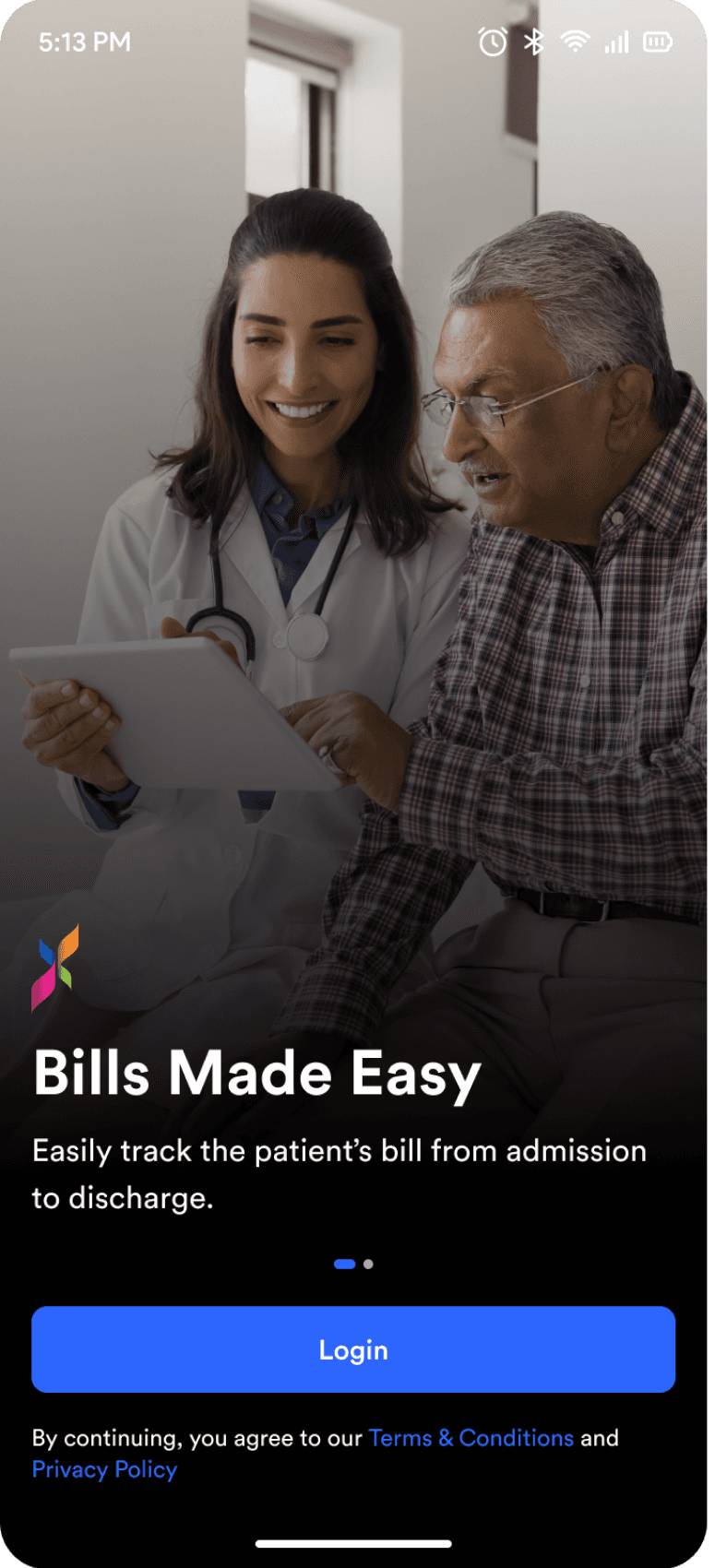
Login flow
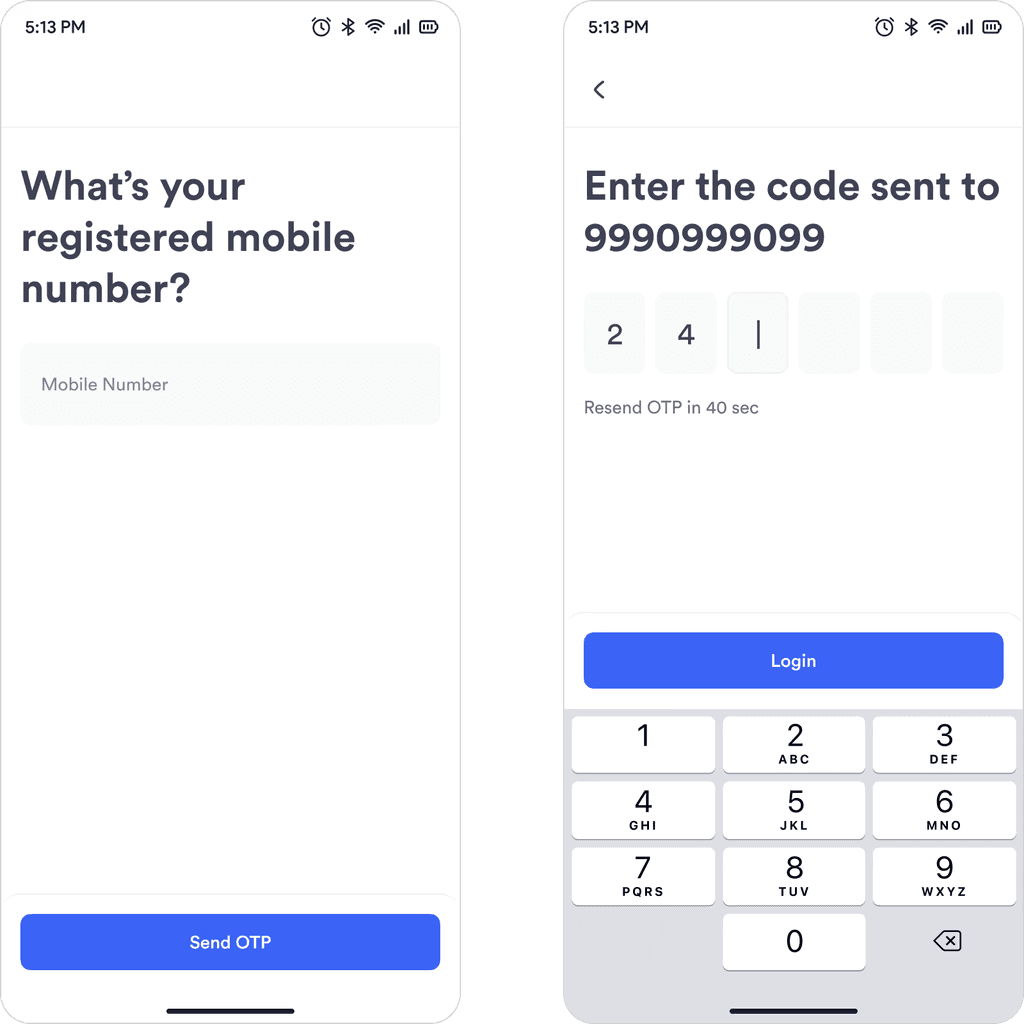
“What’s your registered mobile number” removes any doubt which number the user should enter.
Keyboard on both these steps automatically appears to
reduce interaction.
Error States
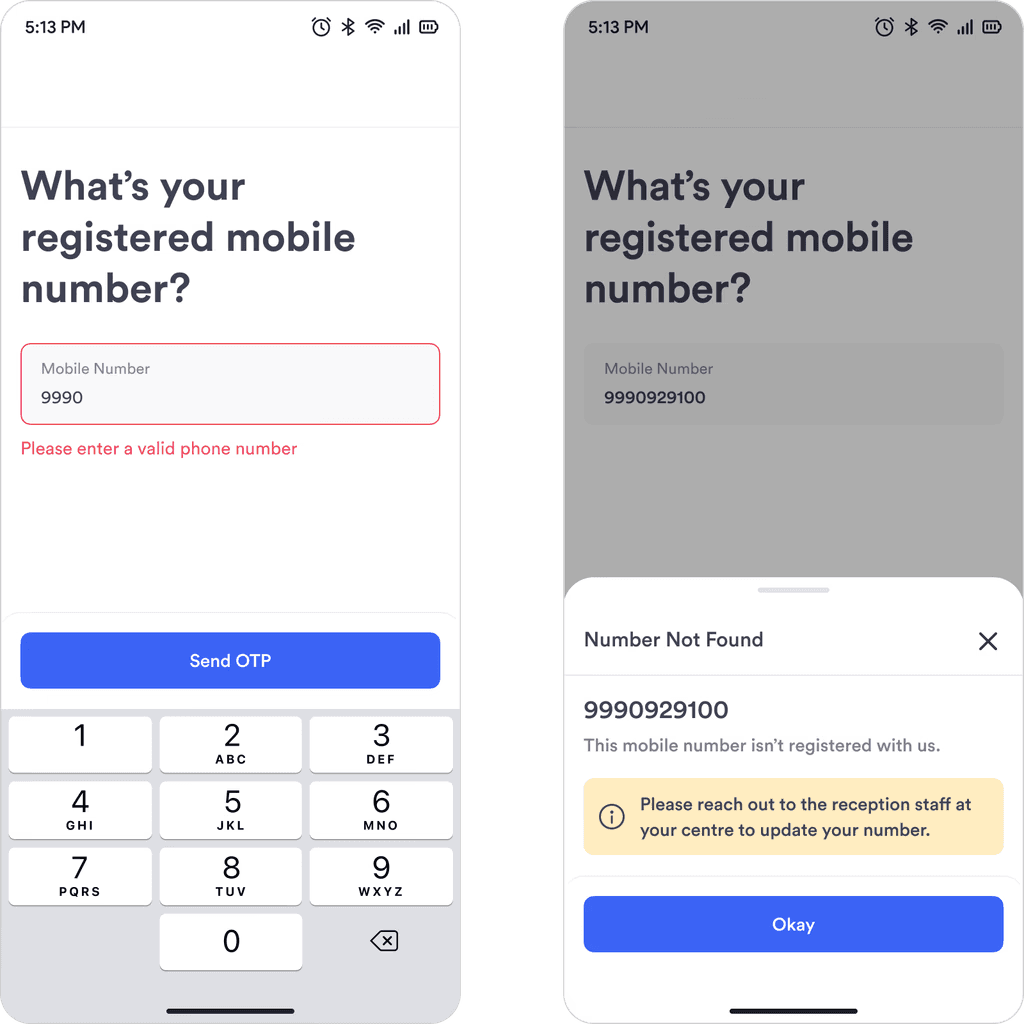
Left Screen
If a user enters fewer than 10 digits, the error message informs them to enter a valid phone number.
Right Screen
If a user enters a 10 digit number that isn’t registered with us for any reason, a bottom sheet would appear with the next steps.
Homescreen
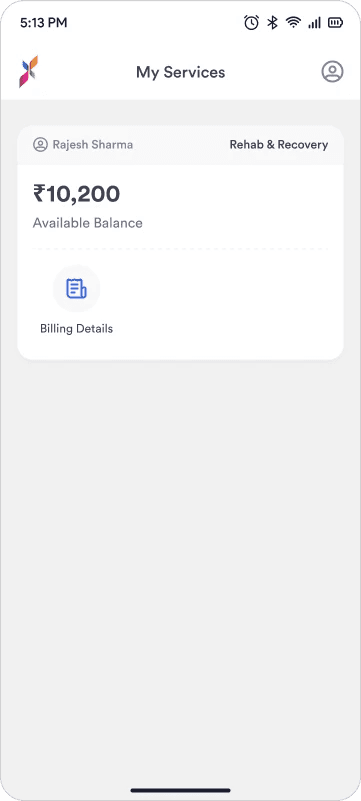
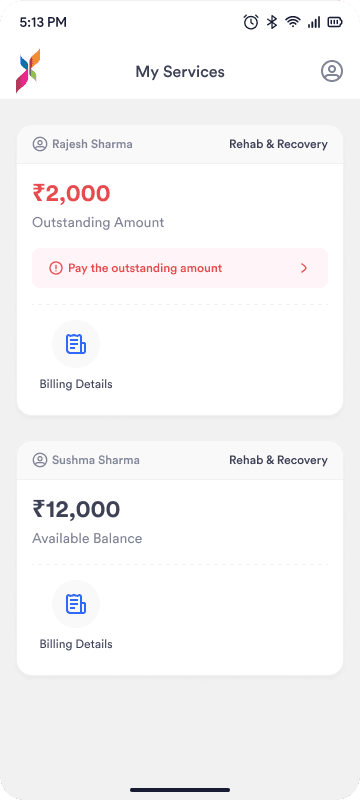
Users will see one card per patient. If a number is registered with two patients, they’ll simply see two separate cards with the primary actions.
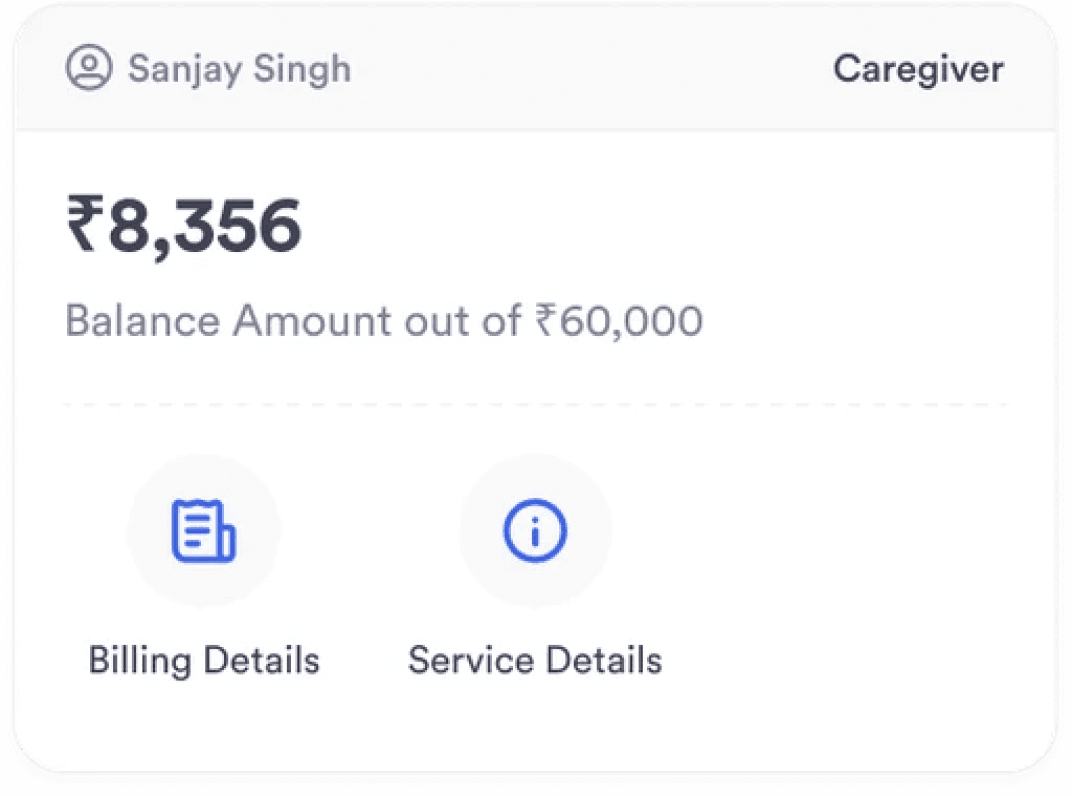
This card can also be used If we decide to bring in other services to the app later.
Note
Since this was the first version of the app, I left extra space on the cards and the home screen. This was a deliberate choice to make room for new features and important updates in the future without having to redesign the entire layout.
Billing Details Screen
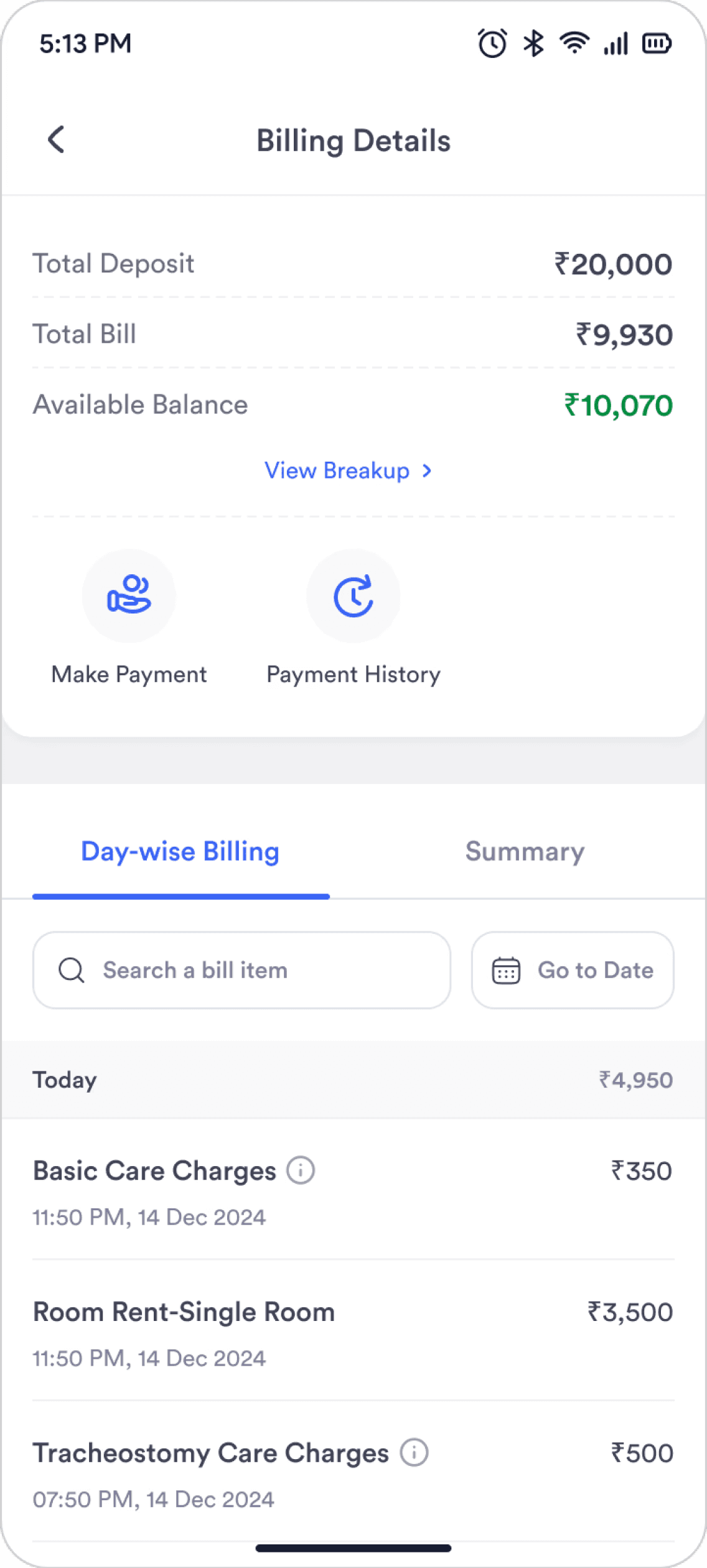
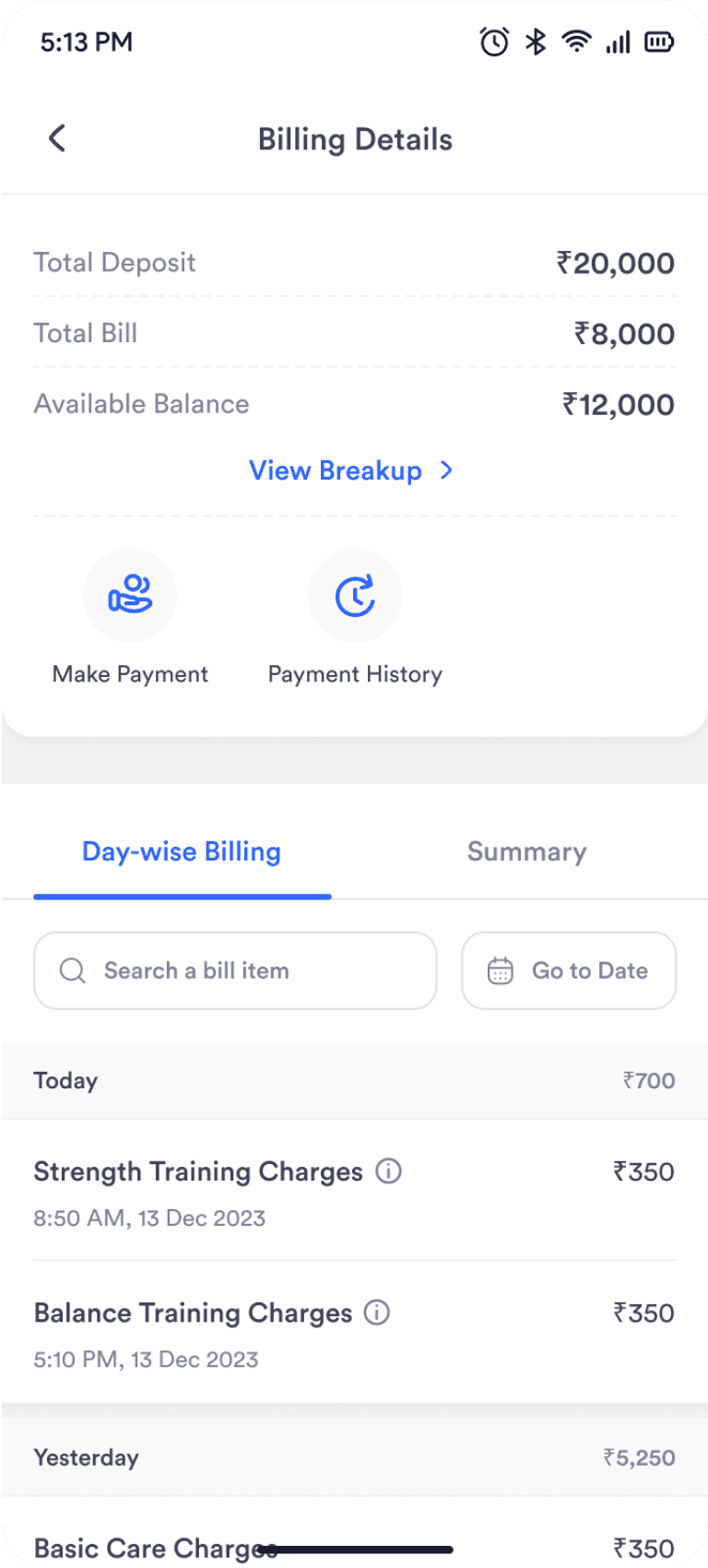
The top section surfaces the total deposit, total bill, and available balance because these are the figures family members look for first, giving them a quick read on their finances.
Right below that are the main actions like Make Payment and
Payment History, placed upfront so users don’t hunt around for what they need to do next
The bill sits below the key info and actions since it’s a longer list. Users can switch between a daily view and a summarised view, matching the two formats we already use in the paper bill to keep the digital experience consistent with the real-world one.
Users can tap the item name or the ‘i’ icon to see details. This
cuts down on back-and-forth with staff, since families no longer
need to ask about every line item.
Make Payment & Payment History
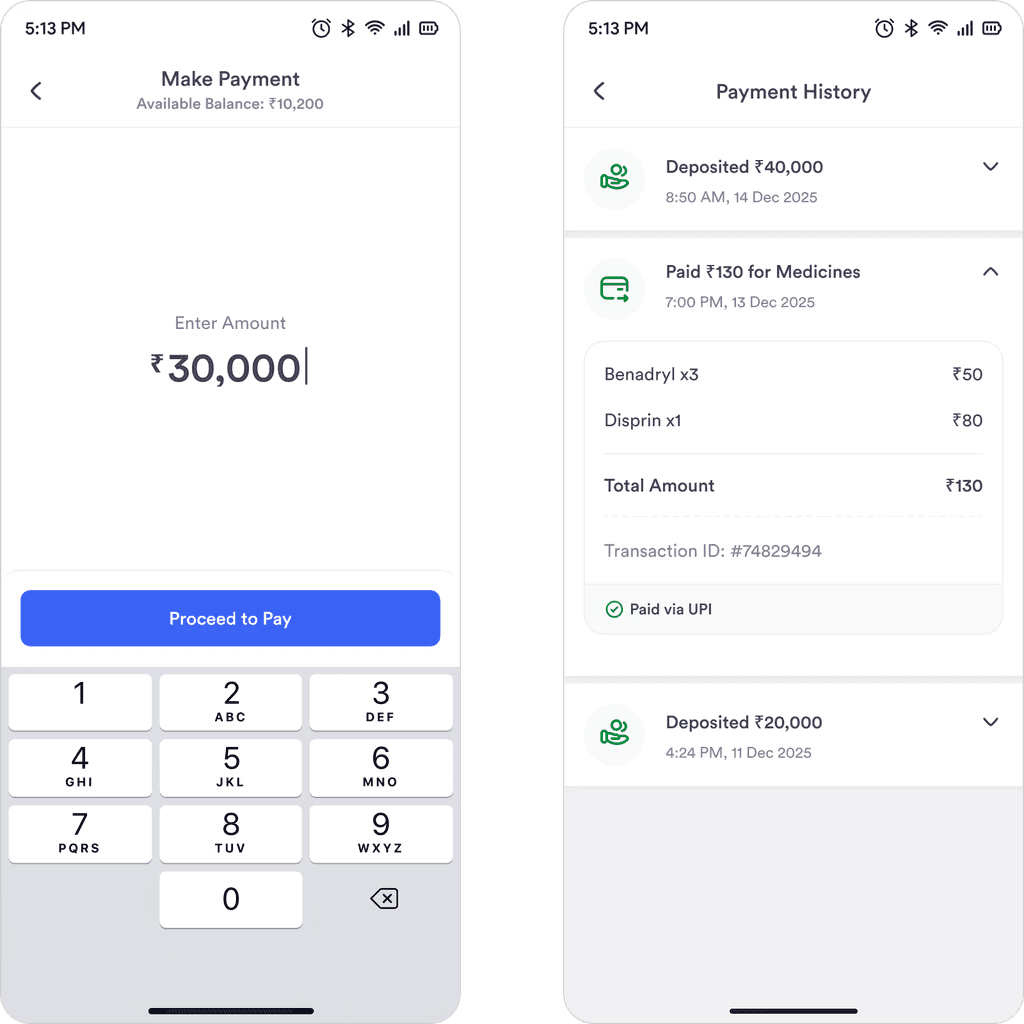
Left Screen
Users can easily pay through the app, the interface is kept similar to Gpay as it is one of the most used payment apps.
Right Screen
Users can quickly review their past payments and see where their money went, which helps them verify charges, clear doubts on their own, and avoid repeated visits to the reception for basic clarifications.
The blind spot
Low Initial Logins
After we launched, we noticed that fewer than 10% of families were actually logging into the app. When we spoke with them, the reason was simple: they didn't even know the app existed.
We had relied on the center staff to tell families about the app, but they were often too busy to mention it. To fix this, the Product Manager and I worked on a plan to make the app visible at every stage of the family's stay.
Whatsapp messages
We automated WhatsApp messages to the primary family member's phone number as soon as a patient was registered. These messages highlighted the app’s benefits and provided a direct download link.
App posters across centers
We placed posters in common areas like the lobby and waiting rooms. Each poster featured a QR code, making it easy for families to scan and download the app while they were at the center.
impact
Numbers started growing after couple of weeks
90%
of users accessed the billing screen once in a month
Adoption jumped from under 10% to nearly 90% in just two weeks after our WhatsApp and poster campaign.
50%
drop in physical bill printout requests
This cut the reception workload in half. Staff now have more time to focus on patient care instead of paperwork.
30%
of users checking billing details every single day
Users aren't just logging in once. They are checking their bills daily, showing that we successfully built transparency and trust.
Learnings
Lessons that I’ll take forward
Working on this project taught me how to balance user needs with business goals. Collaborating with the wider team and applying the feedback helped me mature as a designer.
Adoption comes from providing value
As the app offered a direct solution to the frustration of manual billing, adoption grew naturally as families saw the immediate benefit.
Solve one problem fully rather than 4 problems partially
It is tempting to add every feature at once. However, by focusing entirely on fixing the billing experience first, we built a foundation of trust that makes users want to come back for Phase 2.
Early feedback saves time
Sharing design iterations with stakeholders early on was crucial. Their feedback helped narrow our path and gave us the clarity needed to focus on the most impactful features for the launch.